Wangku Wangku

Know where your money goes, without the chore of tracking it.

Record spending by voice, receipt photo or bank notification. Budgets follow your payday, and your data stays on your phone.

Get it on Google Play Coming soon to iPhone
  • No ads
  • Your data on your phone
  • Pay once, no subscription
  • No account needed
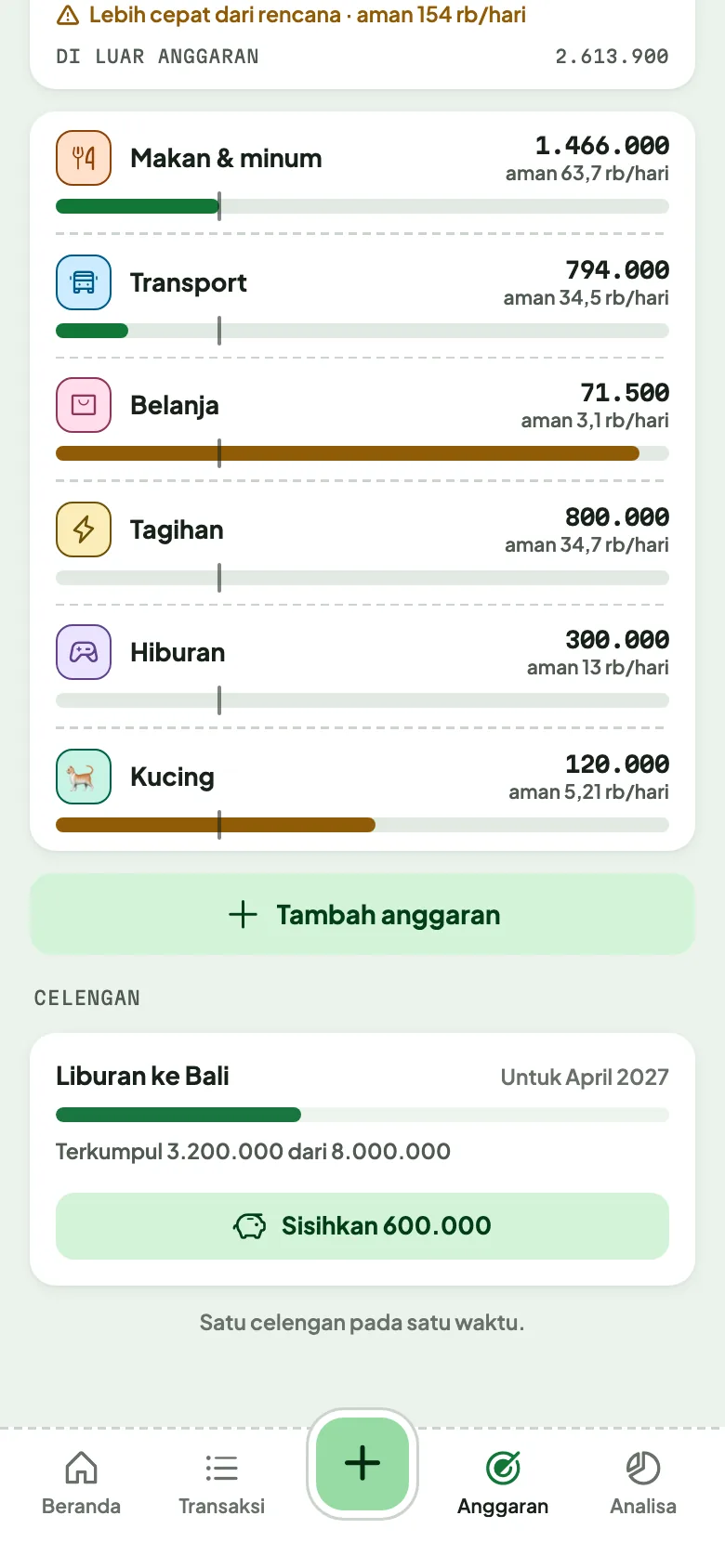
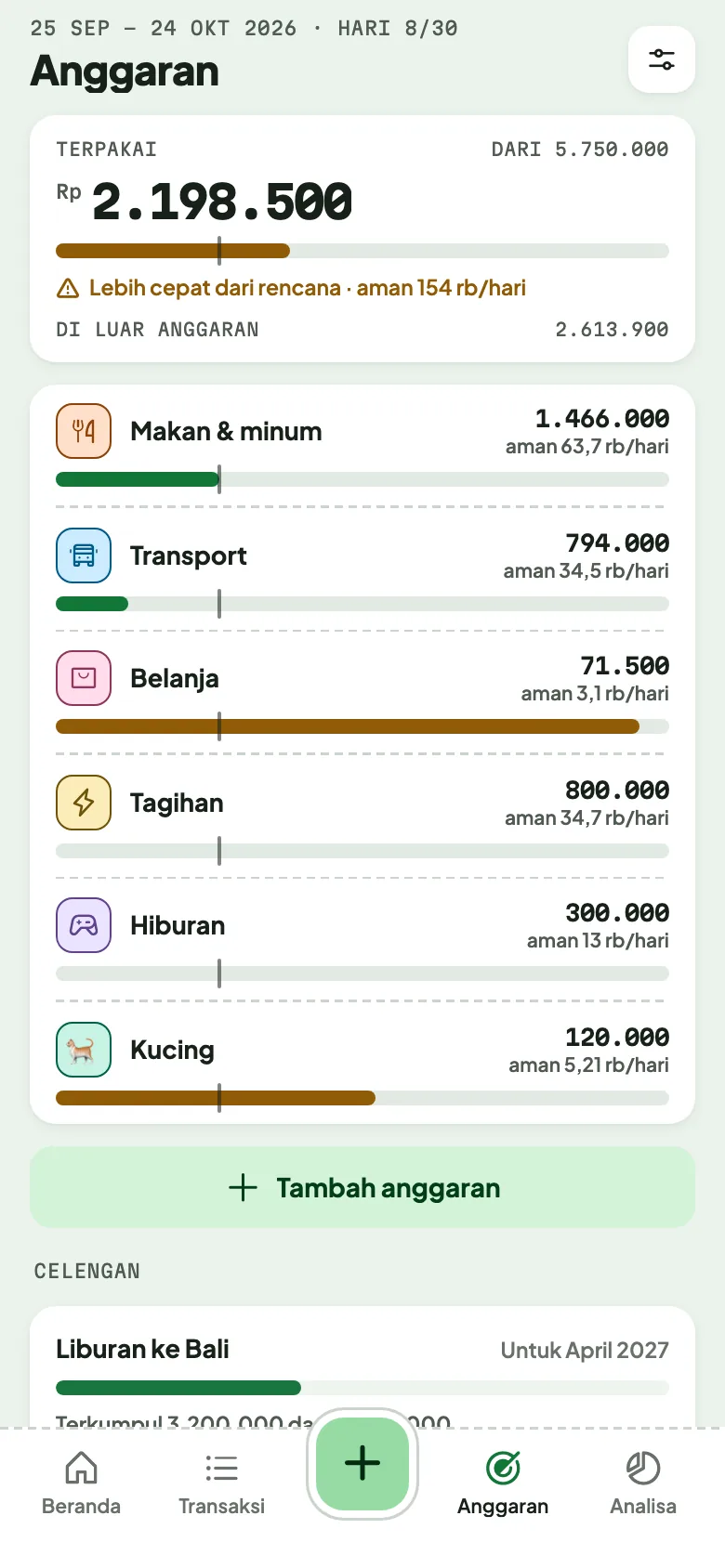
Budget screen: what is left per category in the payday period.
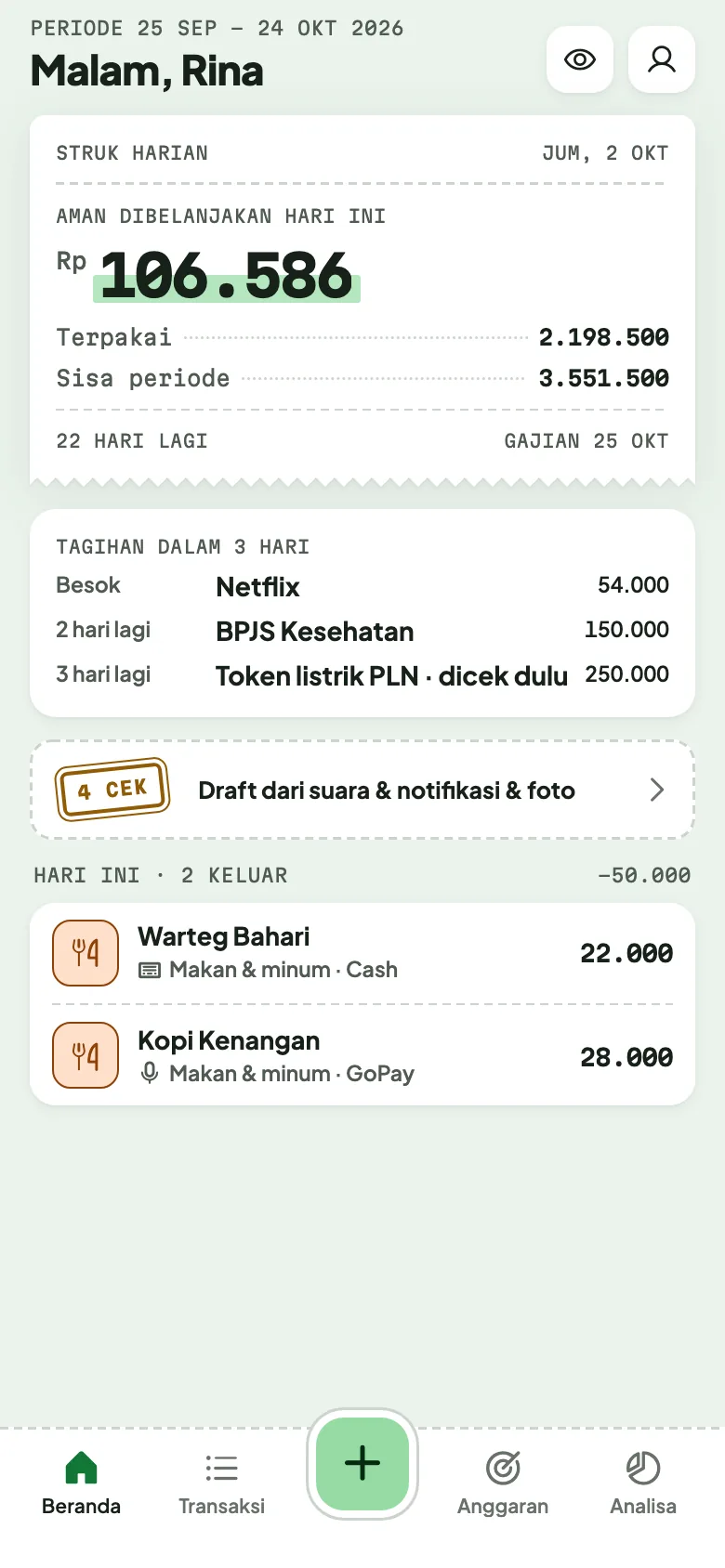
Wangku Wangku home: what is left of this period's budget, what is safe to spend today, and recent transactions.
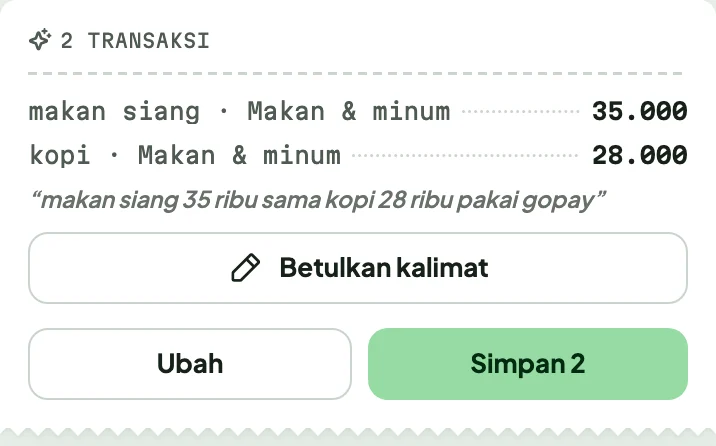
Recording by voice: “lunch 35 thousand and coffee 28 thousand with GoPay” becomes two transactions.
Receipt read for you 2 transactions recorded

Recording

Recording takes a few seconds

Use whatever is easiest at the moment. Wangku tidies it up.

  • Type

    Amount first, category in one tap. Yesterday or last month works too.

  • Voice

    Say “lunch 35 thousand with GoPay” and Wangku fills it in.

  • Receipt photo

    A shopping receipt becomes a transaction, item by item.

  • Bank notifications

    Payment notifications from banks and e-wallets become drafts you only need to check (Android).

  • Share to Wangku

    Send a transfer receipt or a bill from another app straight to Wangku.

  • Widgets

    See what is safe to spend today and start recording from the home screen.

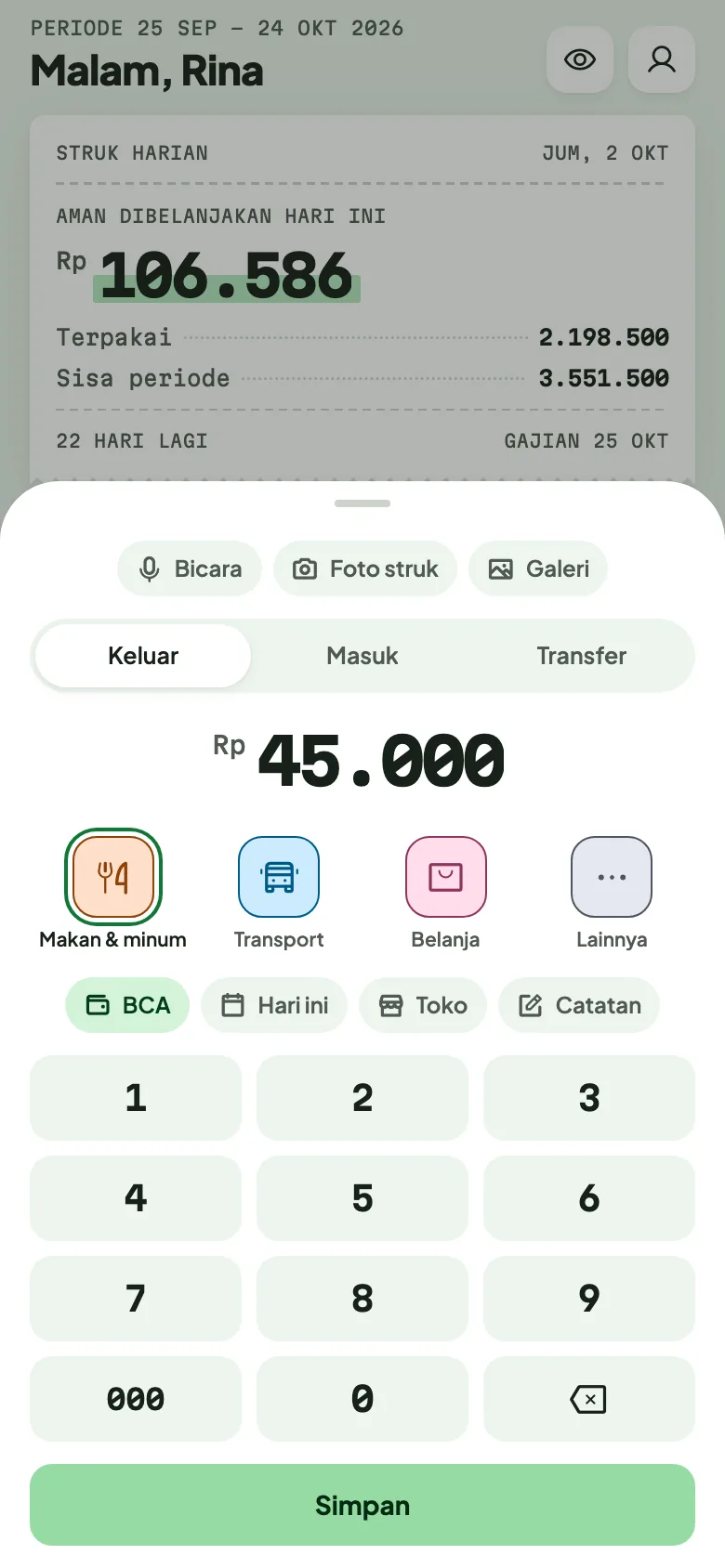
Recording a transaction: amount, category, wallet and date on one screen.

“lunch 35 thousand and coffee 28 thousand with GoPay”

Recorded in 3 seconds

AI assisted

AI does the reading, you make the call

Snap a receipt, type or say a sentence, and AI turns it into complete transactions with category and wallet. You check before anything is saved.

  • Receipts into line items

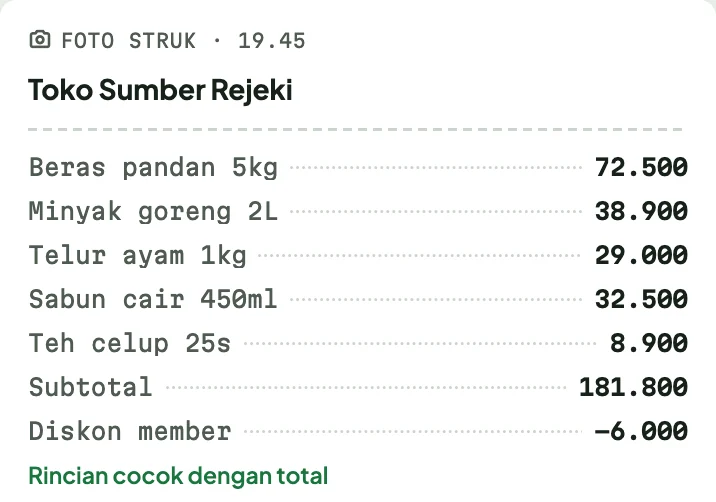
    Every item, discount and total is read, then checked against the receipt's total.

  • Sentences into transactions

    One sentence with several purchases becomes several records at once.

  • A summary you can act on

    Insights show where your money goes by category, shop and wallet, then AI explains it and suggests what to do.

Only the photo or sentence you choose is sent to the AI. For the summary, only the period's totals, never your list of transactions.
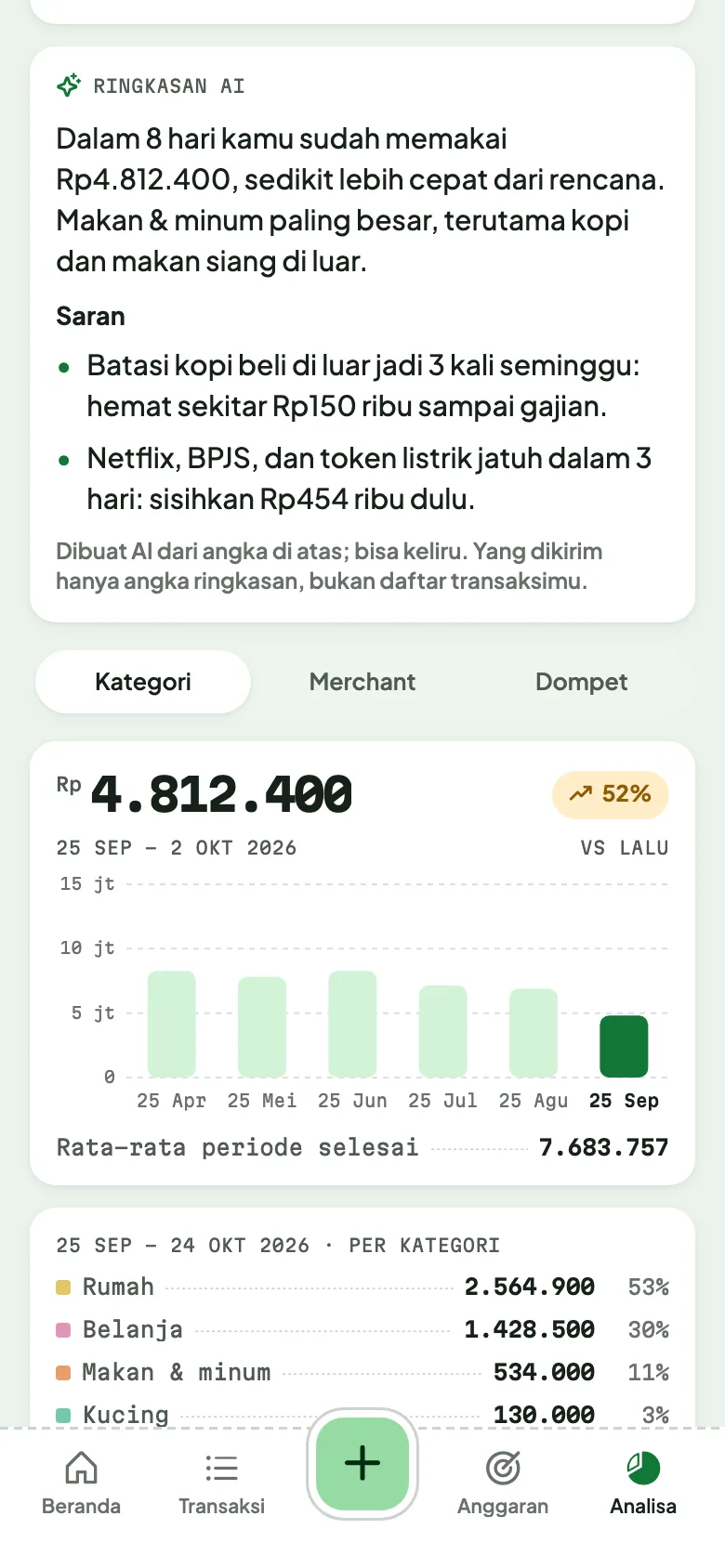
The AI summary on the Insights screen: this period's spending explained, with two suggestions.
A receipt photo read: every item and discount, with lines that match the total.
Example screen

Budgets

Budgets that start on payday

Set your payday and every budget period starts there, not on the 1st.

  • See how much is safe to spend today
  • What is left per category, so you see what is running low
  • Put money aside for goals in savings jars: a trip, a new laptop, an emergency fund
Budget screen: what is left per category in the payday period.
Savings jars: saving for several goals and how far along each one is.

And more

Everything you need, nothing you don't

  • Foreign currency wallets

    Keep dollars or ringgit in their own wallet, apart from your rupiah budget.

  • Household book

    Track together with a partner or family in one shared book. Your personal book stays private.

  • Recurring transactions

    Monthly bills record themselves, with a reminder the day before.

  • App lock

    Ask for your fingerprint, face or phone PIN every time the app opens.

  • Backup & export

    Backup files can be locked with a password. Export to a spreadsheet any time.

  • Dark mode & colours

    Light, dark or follow the phone, with the accent colour you like.

Privacy

Your money is your business. So is your data.

Wangku is built so your money records stay yours. This is what stays on your phone, and this is what goes to the server now and then.

Stays on your phone

  • Transactions, budgets, savings jars and receipt photos
  • The app works fully without an account
  • Backups are made only when you ask, and can be password-locked

To the server, only if you choose

  • Photos or sentences you ask the AI to read: processed then and there, not stored
  • A copy for sync and backup, if you sign in with Google or Apple
  • All of it is removed from the server when you delete your account
  • No ads and no tracking
  • Your data is never sold or shared for marketing
  • Servers on Cloudflare, every connection encrypted (HTTPS)
  • Follows the principles of Indonesia's Personal Data Protection Law

Pricing

Free to use, Pro if you want more

No subscription. Pro is bought once and belongs to your account, so it stays with you on a new phone.

Free

Rp0

Forever

  • Record by typing, voice, receipt photo, sharing and widgets
  • Payday budgets and full insights
  • AI 10 times a day for photos and sentences
  • 3 recurring transactions and 1 savings jar
  • Backup, export, app lock and sync on 1 phone

Pro Launch price

Rp29.000 Rp49.000

One-time payment, until 31 December 2026

  • Everything in Free
  • AI 50 times a day
  • Record from bank notifications automatically (Android)
  • Household book and foreign currency wallets
  • Unlimited recurring transactions and savings jars
  • Signed in on several phones at once

During the test period every Pro feature is free for everyone. The final price is the one shown on Google Play.

Questions

Frequently asked

Is my data safe?

Your records are stored on your phone and the app works fully without an account. If you sign in to sync, a copy is kept on our server on Cloudflare and used only for syncing. You can lock the app, lock backup files with a password and delete your account at any time.

Why doesn't it connect to my bank account?

Wangku never asks for your bank login or access to your account. Transactions come from what you record, receipt photos or payment notifications on your phone, so nobody else holds access to your money.

What if I lose or change my phone?

Sign in with the same account on the new phone and your data comes back. Without an account, restore a backup file (Settings → Backup & export).

Is there an iPhone version?

It is on its way. For now Wangku Wangku is available on Android through Google Play.

Is Pro a subscription?

No. Pro is bought once and belongs to your account, so it stays active when you change phones.

How do refunds work?

Purchases are handled by Google Play, so refunds follow Google Play's policy. If anything goes wrong, email us.

Is Wangku Wangku a financial institution?

No. Wangku Wangku is a money-tracking app. It never holds, moves or manages your money, and it does not give investment advice.

Start knowing where your money goes

Free to install, no ads, no account needed.

Get it on Google Play Coming soon to iPhone